
A request arrives by email. Someone copies the details into a spreadsheet, notifies a coworker and remembers to check back later. It is easy to imagine software doing that work instead.
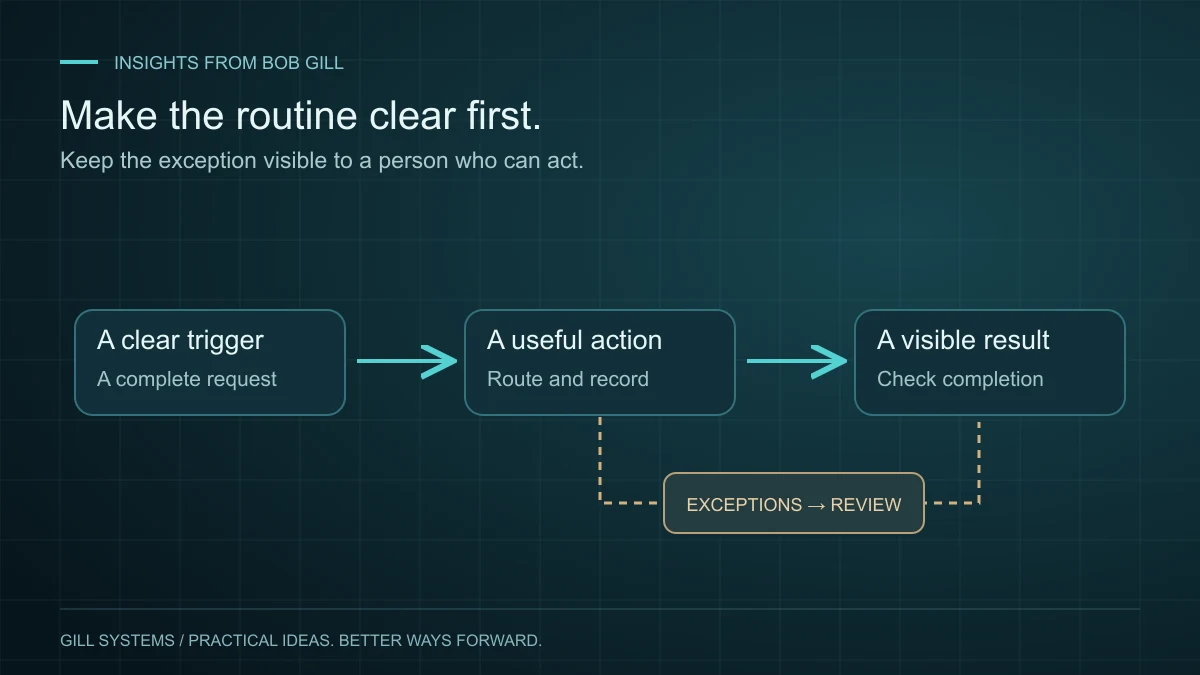
Before connecting applications, I would ask a few questions: What starts the process? Which details matter? Who decides what happens next? What should happen if information is missing? Automation is easier to trust when those answers are clear.
Choose a task with a visible finish
Good starting points might include creating a task from a completed form, routing a routine request or producing a recurring status summary. Choose something frequent enough to matter and bounded enough to understand.
Be specific about the intended result. “A complete request reaches the right person and appears in our shared list” is easier to verify than “automate operations.” First check whether your existing software already supports the workflow.
Write the rule in ordinary language
Describe the trigger, the action and the person responsible. For example: when a field employee submits a complete materials request, record it and notify the office coordinator. If a required detail is missing, send it back for clarification.
That example exposes decisions a simple app connection might otherwise hide. What counts as complete? What if the employee submits twice? What happens when the coordinator is away? Settle the working rule before treating the automation as finished.
Give exceptions somewhere to go
A connection can fail, an account permission can change or an external service can be unavailable. Decide how the team will see unfinished items and who should handle them. Silent failure is especially unhelpful when everyone assumes the task was automatic.
- Keep a record of what was received and completed.
- Prevent a retry from creating duplicate work where practical.
- Make failed or incomplete items visible.
- Keep a manual way to handle the task when needed.
Actions involving customer commitments, payments or sensitive information deserve proportionate controls. A first automation can prepare information for review without making the final decision itself.
Test it with the people who will use it
Try normal requests, missing information and repeat submissions using test data. Ask staff whether the result makes their next step clearer. Track the time spent handling exceptions as well as the time saved entering information.
I built request software to connect field and office staff in a service business operating remotely. The useful part was giving everyday requests a consistent path. That same principle applies whether the solution is an existing feature, a simple integration or custom software.
Start small, observe real use and adjust. A modest improvement that keeps working is a better foundation for the next step than a large workflow nobody fully understands.
Continue reading
TradesUnbound 3 minute read
When does custom software make sense?
Start with the recurring frustration. The right answer might be a smaller change than you expect.
Read the article
TradesUnbound 3 minute read
Different offices. One clear picture of the work.
Connecting locations is only useful if people can find, trust and act on the information they share.
Read the article